Selecting and Applying Cute Dinosaur Silhouette Patterns in Design Projects
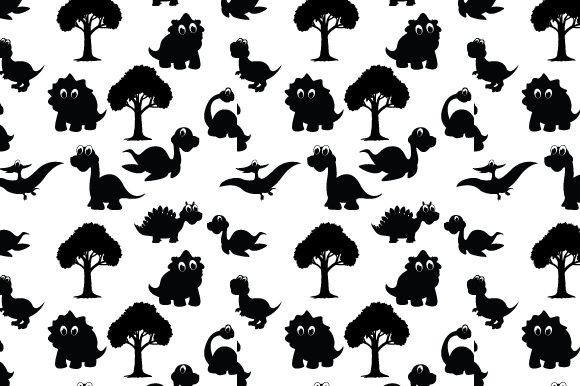
Graphic assets live or die by versatility. A cute dinosaur silhouette pattern might seem like a niche resource at first glance, but designers, educators, and product creators reach for this kind of asset far more often than you would expect. The pattern works because it balances playful visual language with the restraint of simplified shape — no distracting facial features, no cluttered linework, just the unmistakable contour of a stegosaurus, triceratops, or brachiosaurus repeated across a surface. What makes it useful in professional contexts is not the subject matter alone, but how well it adapts to layout constraints, color palettes, and production requirements.
Before committing any pattern to a paid project or printed run, you need to evaluate its structure. A well-built cute dinosaur silhouette pattern should tile seamlessly, hold up at multiple scales, and remain crisp whether you are exporting for a 300 DPI fabric swatch or a 72 PPI web background. These technical qualities matter more than aesthetic charm, because a pattern that fails at production undercuts everything else.
Where Dinosaur Silhouette Patterns Fit in a Broader Design Process
In most workflows, a pattern enters the picture well after the initial creative brief solidifies. You have already defined the audience, the emotional tone, and the output format. A cute dinosaur silhouette pattern typically supports projects targeting children, parents, educators, or nostalgic adults. The silhouette approach keeps the design gender-neutral and age-flexible, which widens its applicability across product categories — nursery bedding, classroom decor, sticker sheets, party invitations, fabric for toddler apparel, or even subtle brand accents for a children's bookstore.
Understanding where the asset lands in your process helps you avoid a common mistake: designing around the pattern rather than fitting the pattern into the design. If you are laying out a picture book spread, the pattern might serve as a background texture behind text blocks. If you are mocking up enamel pins or washi tape, the silhouettes may need to be extracted, spaced, and recolored individually. The pattern file is a starting point, not a finished product. Treating it as raw material — something to deconstruct, recolor, and repurpose — yields better results than dropping it in unchanged.
Evaluating Quality Before Purchase or Download
Not all patterns ship in a production-ready state. When you source a cute dinosaur silhouette pattern from a stock marketplace, creative asset platform, or independent designer, examine these factors before clicking download:
- File format and layers. A flat JPG limits your options. Look for AI, EPS, SVG, or layered PSD files that let you isolate elements, change background colors, or adjust scale without degrading quality.
- Repeat type. Basic grid repeats work fine for wrapping paper and fabric. Half-drop or brick repeats create more organic rhythm and hide seams better on large surface areas. Know which repeat style your production method needs.
- Minimum detail size. Silhouette patterns with tiny dinosaur spikes or thin tail lines may disappear at small scales or clog up in screen printing. Zoom in to 100% and check whether fine details survive.
- Licensing terms. Commercial use, print-on-demand, extended print runs — each license tier affects your bottom line. Verify terms match your intended output before integrating the asset into products.
Spending fifteen minutes on this due diligence prevents hours of rework later. A pattern that looks gorgeous on a 27-inch monitor can fail completely when printed at 12 inches wide on textured paper.
Tool Compatibility and File Preparation
Once you have a high-quality source file, compatibility with your software stack becomes the next checkpoint. Vector-based patterns in AI or EPS format drop cleanly into Adobe Illustrator, Affinity Designer, or CorelDRAW. If you work primarily in raster tools like Photoshop or Procreate, a high-resolution TIFF or PSD with transparent background preserves more flexibility than a flattened PNG. For web and app design, SVG patterns integrate directly into CSS or can be exported as repeatable background tiles.
A practical workflow step many designers skip is creating a normalized master file. Take the original pattern, convert it to your preferred color space (CMYK for print, RGB for digital), and save it as a read-only template. All project-specific recolors, crops, and modifications branch from copies of this master. This small organizational habit saves you from accidentally overwriting the only clean version you have.
If the cute dinosaur silhouette pattern you purchased only came in a single colorway, budget time for recoloring. Global color swatches in Illustrator make batch color swaps straightforward. In raster programs, gradient maps and hue adjustment layers accomplish similar results non-destructively. Changing a navy-on-cream pattern to sage-on-blush shifts the entire tone of the project without altering a single silhouette outline.
Implementing the Pattern Across Different Mediums
Different outputs demand different approaches to implementation. A pattern that works beautifully on a desktop wallpaper will not behave the same way on a cotton tote bag or a die-cut sticker sheet.
Digital Applications
For websites, social media graphics, and digital products, a cute dinosaur silhouette pattern can serve as section dividers, email header backgrounds, or subtle texture layers behind testimonials. CSS repeat functions handle tiling automatically, but you need to export at a resolution that balances visual clarity with file size. WebP or optimized PNG at 72 PPI usually suffices. Avoid scaling the pattern via HTML or CSS beyond its native resolution, as browser-based interpolation often introduces softness that undermines the clean silhouette edges.
Print and Physical Products
Print projects introduce physical constraints. Fabric printing through Spoonflower or similar services requires a specific DPI and often a test swatch before committing to yardage. The repeat edges must align perfectly — even a one-pixel misalignment creates a visible seam across bolts of fabric. Screen printing simplifies color management because each hue requires a separate screen, which means complex multi-color dinosaur patterns increase production cost. A single-color silhouette design keeps screen printing affordable and sharp.
For sticker production and die-cut items, you may want to extract individual dinosaurs from the repeating pattern and arrange them as standalone elements with bleed and cut lines. The pattern structure matters less here than the silhouette quality of each extracted shape. Clean bezier curves along every contour ensure the cutting machine follows a smooth path without jagged edges.
Integrating with Branding and Consistency Needs
Businesses that adopt a cute dinosaur silhouette pattern as part of their visual identity need to think beyond one-off usage. Consistency across touchpoints requires documented pattern specifications — scale percentage, color codes, minimum clear space, and approved background pairings. Without these parameters, different team members applying the same pattern produce noticeably different results, and the brand looks fragmented.
Store these specs alongside your brand guidelines in a shared asset library. Cloud storage platforms like Google Drive, Dropbox, or a dedicated DAM system keep the master pattern file accessible to everyone who needs it while preventing unauthorized edits. Version control matters here too; label files clearly with dates and status indicators so no one accidentally sends an outdated recolor to the printer.
Workflow Integration for Educators and Content Creators
Teachers and educational content developers use cute dinosaur silhouette pattern assets in lesson materials, classroom decor bundles, and printable worksheet designs. The workflow in these contexts often involves assembling multiple purchased assets into a cohesive set — the pattern provides visual continuity across otherwise disparate activity pages.
Practical efficiency tip: build a template file for your most common output formats. If you regularly produce 8.5×11 inch worksheets, set up an InDesign or Canva template with the pattern pre-loaded in the header strip or border area. Each new lesson drops into the content area without having to re-place and re-scale the pattern. This small upfront investment compounds quickly over dozens of projects.
For sellers on Teachers Pay Teachers or Etsy who include patterns in commercial products, checking that your license covers redistribution within derivative works is non-negotiable. Some pattern licenses restrict use on products that compete directly with the original asset seller, so read the fine print even when the pattern is labeled for commercial use.
Managing Pattern Collections for Long-Term Use
Over time, most designers accumulate a library of go-to patterns. A cute dinosaur silhouette pattern might sit alongside botanical prints, geometric repeats, and seasonal textures. Organizing these assets so you can find the right one quickly becomes its own workflow challenge. Tag-based systems outperform folder hierarchies when patterns could logically belong in multiple categories. A single dinosaur pattern might be tagged as children, animals, silhouette, neutral, and nursery. When a client brief specifies a playful but not cartoonish pattern for a baby product line, those tags surface the right file in seconds.
Periodic audits of your pattern library also help. Remove duplicates, note which patterns consistently fail to perform in production, and identify gaps where you lack good options. If the cute dinosaur niche covers your prehistoric animal needs, you can skip purchasing another similar asset and instead invest in something that fills a real gap — underwater silhouettes, woodland creatures, or space-themed repeats.
Execution Tips That Improve Output Quality
Small decisions during implementation ripple through to final quality. When placing the pattern on a product mockup, test at actual print size rather than judging zoomed-out views. A pattern that reads as delicate texture at 25% zoom may reveal awkward dinosaur crowding at full scale. Adjust repeat density or scale before exporting finals.
For patterns combined with typography, contrast becomes the primary concern. Silhouette patterns with varying density — some areas heavy with detailed dinosaur shapes, others more sparse — create uneven reading conditions behind text. Overlay a subtle semi-transparent wash or gradient between the pattern and the type to even out the background without losing the dinosaur shapes entirely.
Also consider edge behavior on products that wrap around three-dimensional forms. A tote bag seam or a mug handle interrupts the pattern repeat, so plan for how the design meets those breaks. Sometimes cropping into a semi-random scatter of individual dinosaur silhouettes works better for 3D objects than a rigid repeating tile.
Connecting Pattern Choices to Project Outcomes
Every asset choice in a project communicates something. Selecting a cute dinosaur silhouette pattern over a more literal, fully illustrated dinosaur graphic signals restraint and modernity. The silhouette abstracts the subject enough to keep the design from feeling juvenile, which is precisely why it works for baby shower invitations aimed at design-conscious parents or for a boutique children's clothing line targeting an elevated market.
When presenting work to clients or stakeholders, briefly note why this particular pattern style supports the project goals. Connecting creative choices to practical rationale — versatility across colorways, scalability without quality loss, age-neutral appeal — builds confidence in your decisions and reduces subjective back-and-forth. A pattern that makes sense strategically survives revision rounds that a purely decorative choice might not.
Ultimately, integrating a cute dinosaur silhouette pattern into your work comes down to treating it as an adaptable design component rather than a fixed decoration. The same asset, handled with attention to technical specifications and output requirements, can surface across digital products, printed goods, brand materials, and educational content without looking repetitive or out of place. The pattern earns its keep by fitting into your workflow cleanly and exiting the process as part of a polished, production-ready result.